
Real-time mahjong AI · Mahjong Soul · Tenhou · Riichi City
Rebuild the table and analyse every turn in real time, with built-in AI for four- and three-player games and optional stronger cloud inference.
 Akagi — Game Dashboard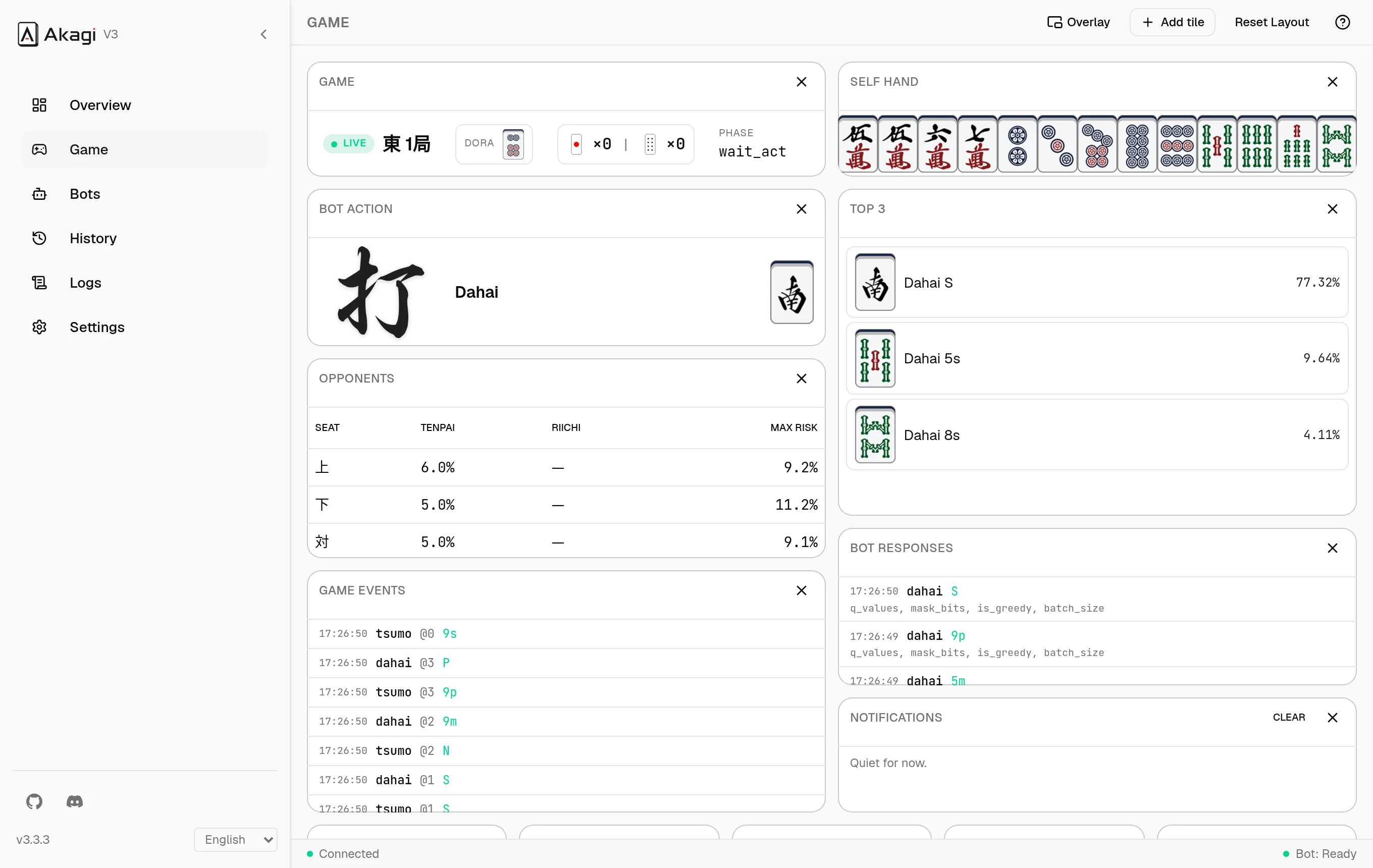
An actual screenshot of Akagi replaying a recorded game. Try it live →
Six readings, every turn.
The moment the board changes, Akagi recomputes the table and lays the numbers out where you can act on them.
Shanten & waits
How far your hand is from tenpai, and which tiles move it closer.
Win & tenpai rate
Estimated agari and tenpai probabilities for the current hand, updated as the game progresses.
Deal-in risk
Per-opponent danger for every tile you hold, so you can quickly see what to avoid.
Recommended discard
Attack and defence choices ranked by expected value, with the waits each choice leaves behind.
AI recommendation
When it is your turn to act, the built-in AI shows its top action, alternatives and confidence.
The full board
Hands, melds, rivers, dora and sticks, all rebuilt in real time from the game you are playing.
Read the game without modifying it.
Akagi only observes the data carried by the game connection, rebuilding and analysing the table on your own machine without modifying the game.
Capture
Read the game’s WebSocket frames through a controlled browser or a local proxy.
Rebuild
Turn frames into mjai events and rebuild the hand, melds, rivers and table state turn by turn.
Analyse
Compute shanten, waits, win rate and deal-in risk, while the AI evaluates the available actions.
Show
Present the table, analysis and AI recommendation in a draggable, resizable HUD.
Chromium
DefaultAkagi launches a controlled Chrome, Edge, Brave or Chromium window and reads game data over the DevTools Protocol. Log in and play without configuring a proxy or installing a certificate.
MITM proxy
System-wideRead selected application traffic through a local proxy. It works with native game clients and other applications you can route through it, and requires trusting a local CA once.
Where Akagi plays.
Four-player and three-player (sanma) on every supported platform. AutoPlay drives the table on Mahjong Soul.
| Platform | 4-Player | 3-Player | AutoPlay |
|---|---|---|---|
| Mahjong Soul | |||
| Tenhou | — | ||
| Riichi City | — | ||
| Amatsuki | Planned | Planned | — |
Every match, recorded and read back.
When a game ends, Akagi keeps it. The History tab turns your sessions into the stats that actually move your rank.
- Rank distribution and a cumulative-PT curve under Mahjong Soul tiers, Tenhou ranks, or custom uma.
- Win rate, deal-in rate, riichi rate, call rate, ryukyoku rate — the full sheet.
- Average winning and deal-in points, average winning turn, yakuman and nagashi counts.
- Filter by platform, player count, east-or-south and date; open any game for the final standings.
Akagi — History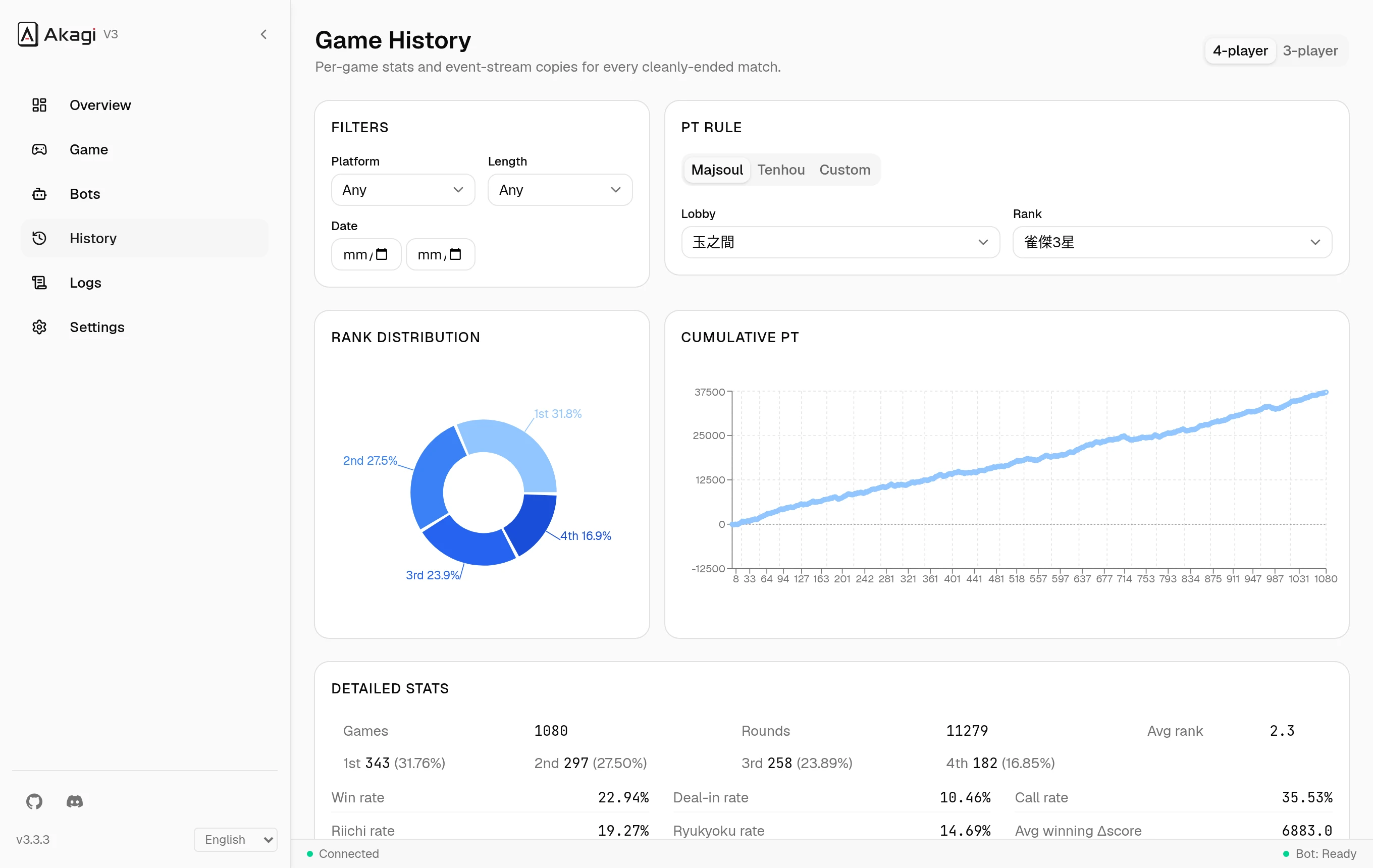
The details that make it nicer to use.
Built-in 4P and 3P AI
Akagi selects the matching built-in model for the table and recommends an action when it is your turn.
Optional cloud inference
Switch to a stronger hosted model when you want it; the built-in model takes over automatically if the connection fails.
Logs & Inspector
A filterable app log plus a frame-by-frame view of WebSocket → mjai → bot reaction, for when something’s off.
Four languages
English, 日本語, 繁體中文, 简体中文 — switch live, anywhere in the UI.
In-app updates
Checks for releases on launch, verifies the download, and swaps itself in place.
One portable folder
Config, logs, history, bots and a bundled Python all live next to the binary. Move it, back it up, delete it.
One folder. No installer.
Download the zip for your OS, unzip anywhere you can write, run the binary. A first-run wizard handles language, platform, capture mode and AI options.
Every zip includes Python 3.12 and uv for optional external mjai bots, with no system Python required.
All releasesBefore you ask.
Will I get banned?+
Akagi is built for studying your own play, and is intended for educational use. Game operators may act against accounts that break their terms of service; any consequences are yours. Read the table, learn, and decide for yourself.
Do I need to install Python?+
No. The built-in AI does not use Python; each release still includes standalone Python 3.12 and uv for optional external mjai bots.
Chromium or MITM — which mode?+
Chromium is the first-run default: Akagi launches a controlled browser and reads frames directly. MITM is system-wide and works for native clients, at the cost of trusting a local CA once.
Where is the stronger model?+
You can enable cloud inference and buy a key or redeem a code in the app. If the server is unreachable, rate-limited or the key is invalid, Akagi automatically continues with the built-in model.
Does it work for 3-player?+
Yes. Sanma is supported end to end, with its own bot slot and uma tables.